Host multiple apps on one VPS
Domain Routing is a reverse proxy: a service that forwards each request to the right app. It sends traffic for a domain or subdomain to a port inside your container. Give each app its own port and its own name, and one container serves all of them.
What you need
- A name for each app: a free subdomain, as in Publish an app on a free subdomain, or a domain you added, as in Point your own domain at your VPS.
- Two or more apps in your container, each listening on its own port.
Example: three apps, three names
app.yourdomain.compoints to port3000, the frontend.api.yourdomain.compoints to port3001, the API.admin.yourdomain.compoints to port8081, the admin app.
Free subdomains work the same way, for example myapp.vps.nasiadka.pl and myapi.vps.nasiadka.pl. On vps.nasiadka.pl, the names app, api, admin, www and dev are reserved, so choose more specific names.
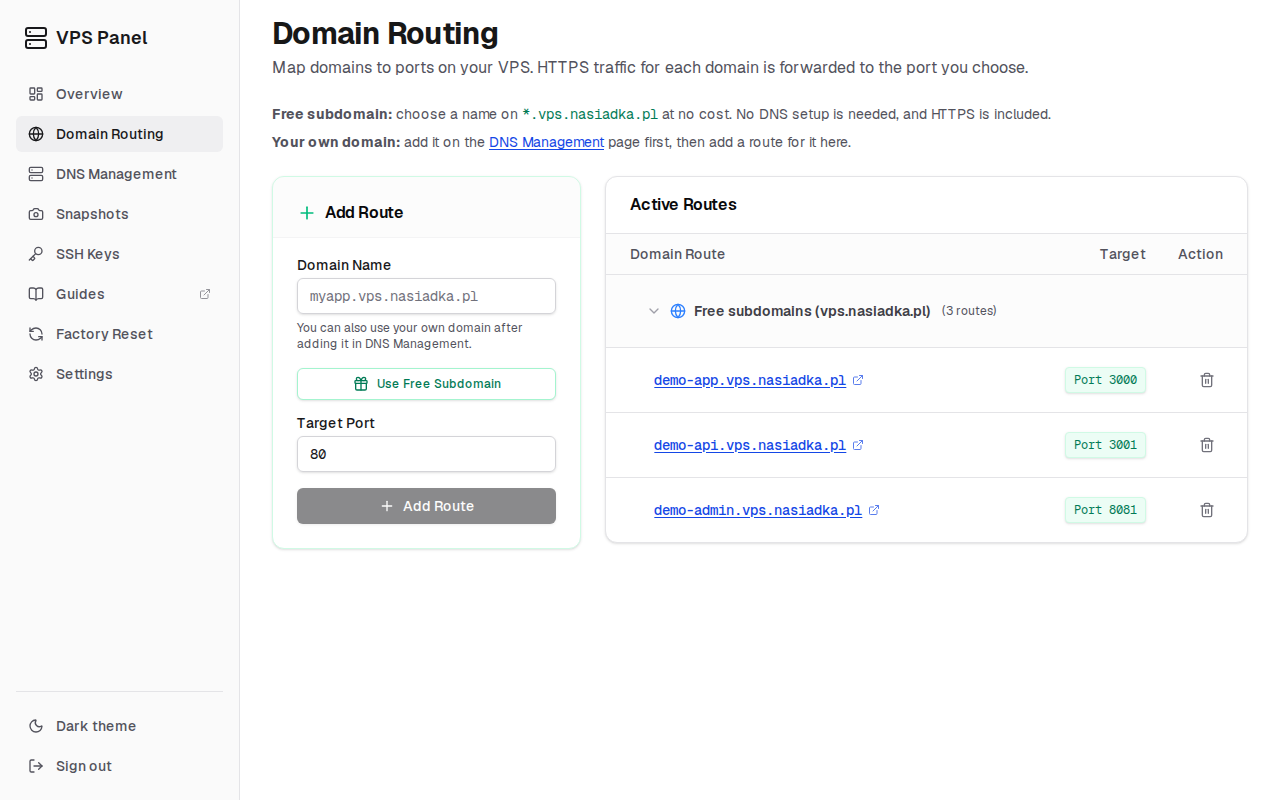
Add the routes
Run each app on its own port
Make each app listen on
0.0.0.0and on a different port. To keep the apps running after you close SSH, see Keep your apps running with PM2.Add one route per app
In Domain Routing, enter the full domain name (for example
api.yourdomain.comormyapi.vps.nasiadka.pl) and the target port, then click "Add Route". Repeat for each app.