Point your own domain at your VPS
You can serve your app from a domain you own, for example mysite.com. You change the nameservers (the servers that answer DNS queries for your domain) once at your registrar, the company where you bought the domain. After that, the dashboard manages the DNS records and issues the SSL certificate that enables HTTPS.
What you need
- A domain that you own, and access to its settings at your registrar so you can change the nameservers.
- An app in your container that listens on a known port. The route in the last step sends the domain to that port.
Add your domain in five steps
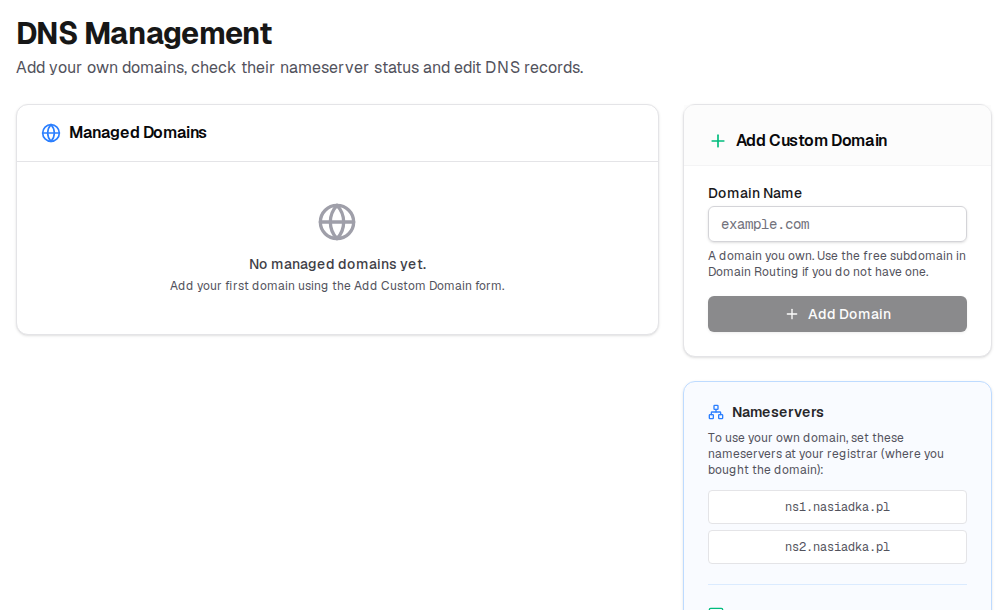
Add the domain in DNS Management
Enter your domain in "Add Custom Domain" and click "Add Domain". If its nameservers already point to
ns1.nasiadka.plandns2.nasiadka.pl, the domain is activated immediately.Set the nameservers at your registrar
In your registrar's settings, set the nameservers of the domain to
ns1.nasiadka.plandns2.nasiadka.pl. The change usually spreads across the internet within a few minutes to a few hours. It can take up to 48 hours.Wait for activation
The dashboard checks the nameservers about every 10 minutes. When it finds them, it activates the domain, issues the SSL certificate automatically and sends you an email. If activation fails, the dashboard retries after a few hours. If an active domain still has no certificate, click "Generate SSL" in DNS Management.
Check the DNS records
DNS Management now lists two A records that were created for you: one for the domain and one wildcard
*record, which matches every subdomain. Both point to the server. On the same page, you can add more records: A, AAAA, CNAME, MX, TXT, SRV, CAA and DKIM.Add a route in Domain Routing
Enter the full domain name (for example
mysite.comorblog.mysite.com) and the port your app listens on, then click "Add Route". To serve several apps from one domain, see Host multiple apps on one VPS.